Monday, 29 October 2018

Future plans for Inguma development

All right.  After the revelations two days ago about Inguma visiting us from the grave, the next thing is to make a bucket list of what needs to be done.  In a somewhat-ordered list of most to least important, this is what I'd like to accomplish:


  1. Port Inguma to GTK+3 + GObject:
    • Inguma is written in PyGTK + GTK+2, which has ceased development several years ago.  GObject is the new introspection from the GTK+ project which allows to allow the usage of language bindings for any library using it without having to rewrite things when the library changes.
    • This should help us keep an easier install procedure for MacOS and Windows.
  2. Port Inguma code to Python 3:
    • While we were not looking, the world has finally moved to Python 3 and things like xdot.py are actually now GTK+3 and Python 3.  This is dependent on third-party code living in the tree or external dependencies that are only in Python 2.
  3. Remove years-old cruft from the tree:
    • Inguma has accumulated a fair amount of old code (pyew, krash, fuzz, scapy, pyshellcodelib, etc.) that it's either plain old and outdated or that has been getting updates in all this time.  Spring cleaning it is!
  4. Remove Bokken from Inguma:
    • Sadly, Bokken is not usable now with radare having evolved on its own for a few years now.  We will need to revisit that at a later stage.
  5. Hide funtionality until it's battle-tested:
    • In the open source world, there's always a debate about whether you should release early and often with incomplete functionality, or shipping only features that work well in a variety of environments and that are not going to crush those testers with very high hopes.
    • Given that our development time is limited, I prefer to stay with a product that shows only stable features, and instead of removing lots of code that could potentially need to be added later, for now just hide everything else behind a config or runtime flag so we don't confuse new users with broken stuff everywhere.
  6. Make documentation great again:
    • We lost the wiki, but even if I'm able to recover it, I'm not sure if a wiki is the best way of keeping documentation updated.  I'm thinking about generating it automatically for specific versions so it's easier to change and upload.
  7. Make modules...modular:
    • The list of actions that you can make with a graph is very limited and hardcoded in lib/ui/target_dialog.py and lib/ui/graphMenu.py (if I'm not mistaken).  In order to make Inguma a proper open-source intelligence client, the list of transforms (borrowing a term from Maltego) has to be extensible and modular, and move away from the actual node-as-IP paradigm.
  8. Ignore (or delete) the text-only Inguma client:
    • For those of you who don't know it, Inguma started as a text-only application until Hugo built the UI in PyGTK.  Having to maintain both is beyond my expectations at this moment, so if you use it and it goes and eats your grandmother, don't come whining.  Take this as my one and only warning.
  9. Fix the terminals code:
    • It's broken (or it will be) when anything of the above happens.  It was already brittle and it doesn't like to be disturbed, but it's not a priority to really fix it.
All the above said, I would like to release a couple of versions in technology-preview mode just to make sure that anyone who wants to test it has a good starting point.

Wednesday, 24 October 2018

Inguma is back, and due team update

As we are approaching Halloween (in the United States, at least) I find quite amusing to announce at this time of the year that Inguma is back from the dead, one more time.

If you like to know the nitty-gritty details about what happened and where we are going, keep reading.  Otherwise:

TL;DR: The Inguma code is now in Github, and we are pivoting it to become a general purpose OSINT tool.

Still here?  Oh, my, you seem to be of the masochistic type.  Let me add some history bits about the project as well.

So...
  • The development team (literally these two dummies writing the blog) is still alive.  No doubt on that.
  • We lost the server that hosted inguma.eu, bokken.re and the rest of the domains, the Mercurial repository, the wikis and everything else.  We are still in control of DNS and everything but it will take the undersigned (i.e. Ender) some time to come up with a web server, mail server and the rest.
  • Hugo and I have been very far from each other, and not exactly with a lot of time in our hands.  Life changes made things more difficult.  Bokken, the only piece of the project that was still moving forward, became obsolete (more on this later).
  • I was not working as a security professional when I started helping with the project.  Since then, many things have changed and I have been working as such for the last 6 years.  Needless to say, I see the world in a different way now.
  • Inguma was a project that Hugo inherited from hacker extraordinaire Joxean Koret, which was console-only, and which Hugo converted into a dual console-PyGTK application. Bokken, a UI around the reversing framework Radare, was then started around 2011 in the same fashion (a PyGTK application) using the radare Python bindings due to radare being console-only.  We saw the potential to merge it with Inguma in some way, and Bokken became the reversing engine in Inguma apart from being an standalone application.
  • Somewhere in 2015 the Radare team expressed that they would like to use Qt and Hugo remade Bokken in a matter of weeks in C++ and Qt as a new project called iaito.  Some time later, the Radare team decided to stop using it and they adopted it into their Github repos as Cutter.
  • At the same time, Inguma hadn't seen a commit since 2012.  We were very focused on making Bokken a success, and working in a codebase that was as disorganized (due to its long, organic growth) as Inguma was a barrier.  I wanted to add an HTTP server, proper modules, unit tests, move it to GTK+3, and many other things, but ended up putting only half of the work needed for every one of those things.  A true love-hate relationship.
  • At the same time, Hugo had started using Inguma as the base for several personal modified versions with airplane modules for his talks about airplane security (after all, he's a recognized world expert on that field).  He was using it mostly as a pen-testing framework and was reasonably happy with it.
  • So fast forward, and we then lost the server with everything.
And then, several weeks ago, I started to look for free software replacement for Maltego, the Open Source Intelligence program.  And do you know what?

There's none.

I thought of using my experience with Inguma and Bokken to write something simple in GTK+3.  After a couple of tries, I dug into my hard drives and I found my Inguma checkouts.  I realized that I had pretty much everything I needed: a modern UI, most of the heavy work that an interface needs, and a graph engine based on Graphviz.  I could just reuse some of the parts.

Long story short, I talked to Hugo and, while he seemed a bit reluctant at first, I managed to get him excited about reviving Inguma and converting it into something... different.

So that’s it. I’m dropping a lot of the old cruft in Inguma that has been outdated since 2012 or before, bringing it up to speed regarding modern codebases, removing (for now) some of the exploiting/terminals/reconnaissance UI, and adding a lot of features to be able to work as a OSINT manager.

See you out there.  It’s going to be great. 

Friday, 21 August 2015

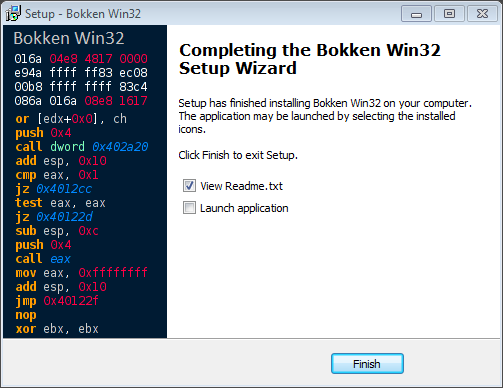
Windows installer!

This is a small blog post for a big announcement, at least if you are a Windows user! We know that installing Bokken is not the easiest task, mainly if you use the Microsoft's platform; but that has just changed with the arrival of the new Bokken Windows installer!

Thanks to the excellent job of HardcoreHacker now installing Bokken in Windows is this easy: just download the new installer and it will take care of everything:


The installer will also take care of Bokken's dependencies and will ask you to install Python and PyGtk in case it's needed. And that's all, folks, Bokken successfully installed!


Just a few clicks and Bokken's icon will be on your desktop waiting for you to launch it!


The installer has been tested in the following Windows versions:
  • Windows XP x86
  • Windows 7 x86_64
  • Windows 10 x86_64
If you encounter any problem, just let us know and we will fix it as soon as possible.

Now just go, download Bokken and enjoy it in your favorite platform!

Wednesday, 10 June 2015

Bokken 1.8

It has been just one month and we are back with a new release of Bokken, 1.8 is here! This release was meant to be a minor one, with just support for the latest radare2 version but... look at it by yourself:


Bye, bye, pyew

Bokken started as a UI for pyew and radare2, and we tried hard to maintain both backends in our development. Sadly, pyew moves very slowly and has a different set of skills than radare, so although it's a tough move, we decided to strip down all pyew functionality from Bokken altogether. Given that there's nothing else in the OSS world that fulfills this niche, we will be tied to r2 for a while.  Maybe it's for the best, as the deletion allowed us to clean a lot of old cruft and compatibility code that has been in Bokken for ages.

radare2 0.9.9

As always, if a new radare2 version is released then we update Bokken to work with it! Bokken 1.8 works perfectly with (and ONLY with) radare2 0.9.9.

Sections tab

In an effort to better organize the UI we have moved the Sections information to a new tab in the right panels. More work will be done for future releases to make it better.


Simplified file info tab

Most of the contents of the File Info tab were duplicated and, being honest, useless. So we have decided to remove most of the contents, leave only the useful ones and present them in a better way.

Removed string repr tab

Time has arrived to say goodbye to this useless tab. Farewell!

New relocs side panel

After moving the Sections panel to the right we decided to use the space for a new and very useful panel: Relocs!

New strings tab

The Strings tab has gone under a complete remake and now it looks better and is easier to use.


New radare2 console

If you look at the above picture, you may spot an area in the lower section of the UI.  Say goodbye to the Interactive tab and welcome the brand new radare2 console! Way easier to use that the previous one, you can find it as a new bottom panel that can be resized and hidden.

New Python console

There is more: Python! Either love it or hate it, but we finally added a Python console to Bokken! Located in the new bottom panel it exports Bokken and radare2 objects such as the radare2 RCore instance, RBin and most of the data gathered by Bokken.  Expect some tutorials as we polish that feature.


Download Bokken 1.8 today!

Tuesday, 5 May 2015

Welcome Bokken 1.7

Yes, we know, it has been a very long time since the last release and most of you thought that the project was dead. I am happy to be able to say that it was not dead, just taking a long nap. And now we are back and with a new Bokken release!

Bokken 1.7 is here and though it is not a major release it still has some nice new features and improvements; let's see them, shall we?

radare2 0.9.8


Bokken 1.7 has been updated to work with the latest radare2 stable release, (0.9.8) and it benefits from all the improvements and stabilization that is offered by that great software.

That was one of the most demanded features and we are happy to finally have Bokken running smoothly with the last radare2. We will do our best to keep supporting the latest releases!

Improved graphs


The graphs have been improved in both functionality and appearance. They now work better and look really nice! Did you notice the small graph preview on the lower right corner?


Word highlight


This new feature make it easy to follow the code by highlighting all the words like the one the cursor is placed on. Useful to, for example, find all the "call" in a function or follow that register that contains important data!


ARM support


Although Bokken can open and analyze any format supported by radare2, interactivity and syntax highlighting now also works with ARM binaries! We will keep adding more in future releases; any preference? Let us know!


Bindiff fixed and improved


Working better than ever and with more visual enhancements, Bokken's binary diffing is now way better!


More analysis options


This new release supports more binary analysis options offered by radare2, so in the initial dialog it is now possible to choose... well, better look at them by yourself! Can you spot the new ones? ;)


Tooltips!


Tooltips everywhere! Place the mouse over an address, function or symbol and a tooltip will popup with a brief disassembly. But not just that, same functionality can be found in the functions list on the left panel, no need to move to a function to take a quick look.


Download and enjoy


Not bad for a minor release, right? Good, because that's not all, we still have one last thing:

A brand new project domain and website!

No screenshot this time! If you want to view it then go to the new website and further explore the new release. We hope that you decide to download and try it by yourself.

If you feel in the mood, go by the development site and give us feedback to further improve Bokken. And don't forget to follow the project in Twitter to get all the project news.

Happy reversing!


Wednesday, 1 January 2014

Debian radare2 0.9.6 published and broken Bokken.

I have just published the radare2 0.9.6 packages for Debian in the Inguma Debian repository (http://deb.inguma.eu).  They are in their way to the official archives, but due to several new packages, it will take them a while to reach unstable as they have to go through the FTPmasters' manual approval.

We have been using radare2 0.9 as the base API in Bokken (it was the latest packaged), for the past two years, and this new release breaks the internal r2 API in several ways, so Bokken is not able to load a single binary.

Over the course of the next few days I will be adapting the code to talk to radare again and to force specific versions of the API to make sure this is a less likely event.

See you in mercurial!

Friday, 20 April 2012

Moving towards Inguma 0.5


It's been quite a long time since our last update so let me show you what has been going on these last weeks.

Inguma 0.5


After the last Bokken release we have focused on Inguma 0.5 development and now I'm going to show you some of the new features we have been working on.

We've done some GUI improvements in order to make it simpler, cleaner and to integrate the last Bokken release:


Look at the new main button that integrates all the common tasks and the simplified toolbar. Also the right panel has been improved by adding expand/collapse buttons as well as filter buttons by Target OS.


The Vulnerabilities panel has gained in eye candyness and functionality with the expand/collapse buttons or the "Open with Bokken" menu option.


Most of the work for this release has been focused on the Terminals tab, which has been redesigned and greatly improved.


As you can see, it now features many buttons to manage terminals and its contents as well as a filesystem panel that integrates perfectly with terminals and the rest of the GUI. From here you can import and load host lists, nmap scans, Inguma modules... and more.

Finally, the new feature that joins all the new changes is what we have called Listeners. By creating listeners you can now connect with your compromised targets and go ahead with post-explotation. :) Let's see how it works.

In order to listen for reverse connections, or directly connect to a exploited target, simply create a local or remote listener on the toolbar popup.


You will see the newly created listener in the right panel, under Listeners tab, as well as its status: connected or listening. From here you can disconnect or destroy them using the menu.

Once you have connection with a compromised target you will be able to interact with it on the Terminals tab, but this is still WIP :)

Of course Bokken has been updated to the latest release on the Reversing tab.

RootedCon 2012


On March 1st, 2nd and 3rd the RootedCon security event was held in Madrid and one of our developers, Hugo Teso, was there to talk about Inguma, Bokken and how to use it in security research.

The talk, entitled Inguma 0.5 RedWagon, exposed the ability of Inguma and Bokken to study the security of an uncommon system, in this case Unmanned Aerial Vehicles (UAS), both amateur and comercial ones. For this purpose a special edition of Inguma was coded, featuring UAV Command and Control software, with more protocols added to the network fuzzers among others.

The UAV C&C is an integrated WASP Ground Control Station, modified to be able to handle different UAV Autopilots (AP), from configuration and compilation to run and control:


Within the C&C tab many APs can be configured and run, either in SITL or HITL, such as ArduPilot Mega, Paparazzi or WASP. After using the Fuzzers to find vulnerabilities, either the Networking or the C&C tabs can be used to exploit a vulnerable UAV, depending if the vulnerability affects the GCS or the UAV directly.

In order to reverse-engineer the vulnerable AutoPilot or Ground Control Station, Bokken with Radare2 core was used, so the whole process of vulnerability finding, development and exploiting has been done with Inguma and Bokken :)


Here you can see some fotos of the talk and some slides.

As you can see, the lack of news doesn't mean lack of activity as we have been really busy :) Stay tuned for more updates and upcoming releases!

Contributors